Try a Sample Dataset
Use a sample dataset when you want to explore Wren AI before connecting your own data.
This guide introduces the built-in sample datasets you can use to practice querying, analysis, and visualization in Wren AI.
By working with a sample dataset, you can learn the product workflow before modeling your own warehouse.
About the E-commerce Dataset
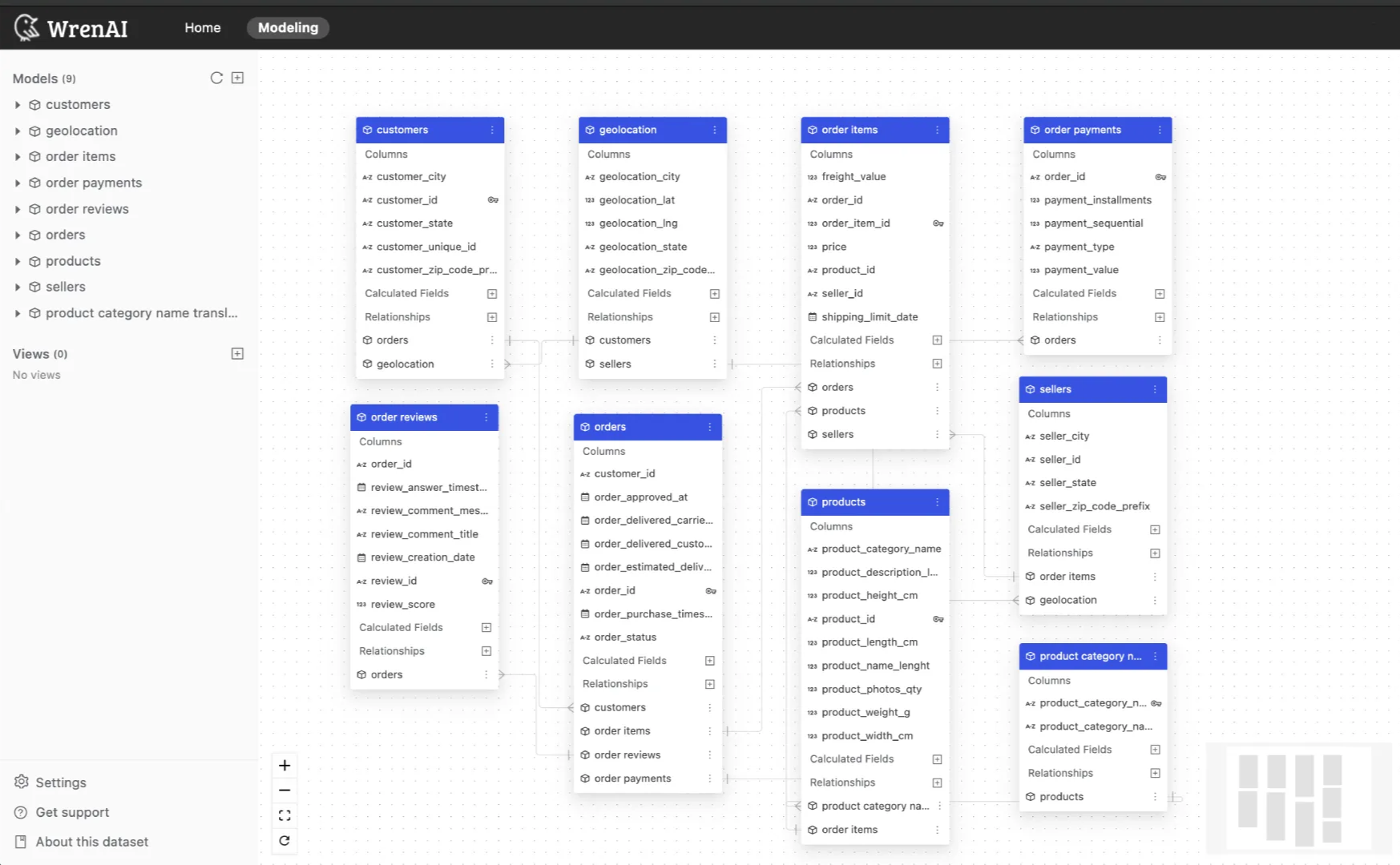
This sample dataset has been adapted from the Brazilian E-Commerce Public Dataset by Olist on Kaggle. This is a Brazilian e-commerce public dataset of orders made at the Olist online store. We picked this dataset as it has a good amount of data and is comprehensive enough to cover the scope of an online e-commerce shop, from order placement and shipping to the order review process.
This dataset provides customer information and their locations. Use it to identify repeat customers and find where orders were delivered. Each order has a unique customer_id, but the same customer might have different IDs for different orders. The customer_unique_id helps you find customers who have made multiple purchases.
Key things to keep in mind about this dataset:
- The period of the data is from 2016 to 2018
- All column names and descriptions are in English
- The product categories in the tables are in Portuguese. However, there is also an English column with translations.
- Null values will be displayed as 'null' in the preview data. You can filter for null values in your queries.
About the Card Transaction Dataset
This comprehensive financial dataset has been adapted from a Financial Transactions Dataset: Analytics dataset on Kaggle. It combines transaction records, customer information, and card data from a banking institution. We picked this dataset as it is comprehensive enough to cover a wide range of analytical goals, from synthetic fraud detection and customer behavior analysis to studying market trends.
This dataset provides detailed customer and card information linked to individual transactions. Use it to analyze spending patterns, customer demographics, and financial profiles. The Transactions_Cleaned.csv file is the central table, which can be linked to Users_Cleaned.csv to get customer details and Cards_Cleaned.csv to get information on the cards used.
Key things to keep in mind about this dataset:
- The period of the data spans the 2010s decade.
- A separate file,
train_fraud_labels.csv, provides 'yes'/'no' labels to identify fraudulent transactions. - Merchant categories are provided as codes (
mcc) in the card transaction data, which can be translated using themcc_codes.csvfile.
About the Hotel Rating Dataset
This comprehensive, synthetic dataset has been adapted from the International Hotel Booking Analytics dataset on Kaggle. It is designed to emulate the booking and review data of a major hotel platform. We picked this dataset as it provides a rich, interconnected environment to explore customer satisfaction, hotel performance, and market trends.
This dataset provides user demographics and hotel information linked to individual reviews. Use it to analyze customer satisfaction, booking behavior, and hotel performance. The reviews.csv file is the central table, which can be linked to users.csv to get customer details (like country and age) and hotels.csv to get hotel attributes (like city and star rating).
Key things to keep in mind about this dataset:
- This dataset covers the period from August 2020 to August 2025.
- This is a synthetic dataset, so the data is realistic but does not represent a specific real-world company or time period.
- The
reviews.csvfile is the core of the dataset, linking the other tables viauser_idandhotel_id. - The dataset's focus is on quantitative feedback, with
score_overalland other detailed numerical scores provided for each review.
About the Human Resource Dataset
This dataset is a classic sample database created by MySQL, often used for learning and practicing SQL. It has been adapted from the Employees Sample Database found on Kaggle and the official MySQL documentation. We picked this dataset as it provides a clean, relational structure perfect for practicing joins, aggregations, and analyzing a fictional company's organizational structure.
This dataset provides demographic and employment details for a large company. The employees.csv file is the central table containing employee information. This table can be linked to salaries.csv to get historical salary data, and to departments.csv via the dept_emp.csv (for all employees) and dept_manager.csv (for managers) tables to understand the company's organizational chart.
Key things to keep in mind about this dataset:
- The data covers a period primarily from 1950 to 2002.
- A
to_dateof9999-01-01is used in tables likesalariesanddept_empto signify that this is the employee's current salary or department assignment at the time the dataset was created.
About the Supply Chain Dataset
This dataset has been adapted from a Supply Chain Analysis dataset on Kaggle, provided by a fashion and beauty startup. It details the supply chain for makeup products. We picked this dataset as it provides a clean, relational structure that covers the entire process, from manufacturing and suppliers to final sales and shipping.
This dataset provides detailed product, supplier, customer, shipping, and manufacturing information. The sales.csv file is the central transactional table. It can be linked to products.csv to get product details, suppliers.csv for supplier information, customers.csv for customer demographics, shipping.csv for shipping details, and manufacturing.csv for production data.
Key things to keep in mind about this dataset:
- The data is specific to makeup products from a fashion and beauty startup.
- The dataset includes performance and quality metrics like
Defect rates(inmanufacturing.csv) andInspection results(insales.csv).
Use a Sample Dataset
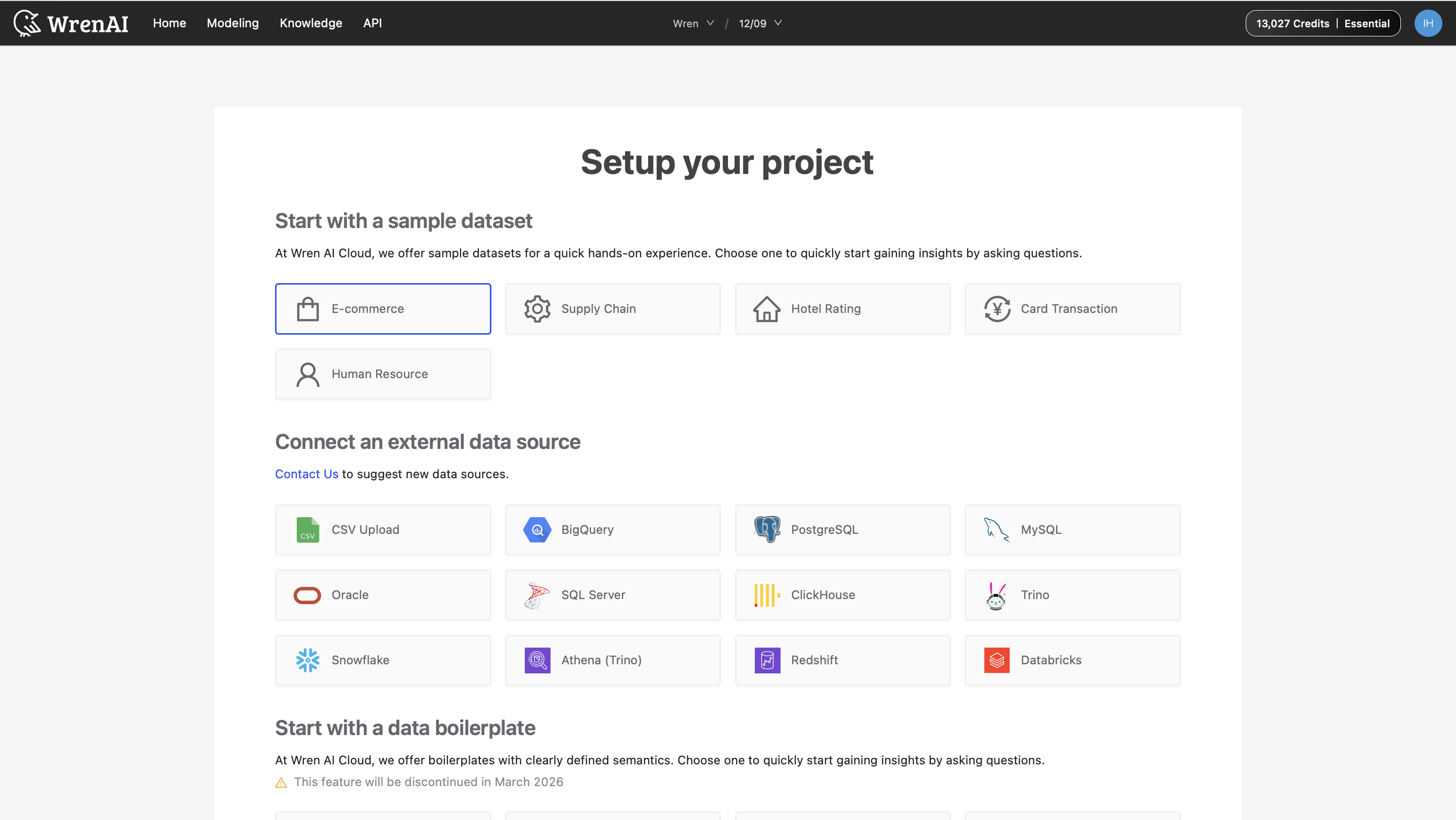
Create a new project and select a dataset from the ‘Start with a sample dataset’ section.
Explore the Data
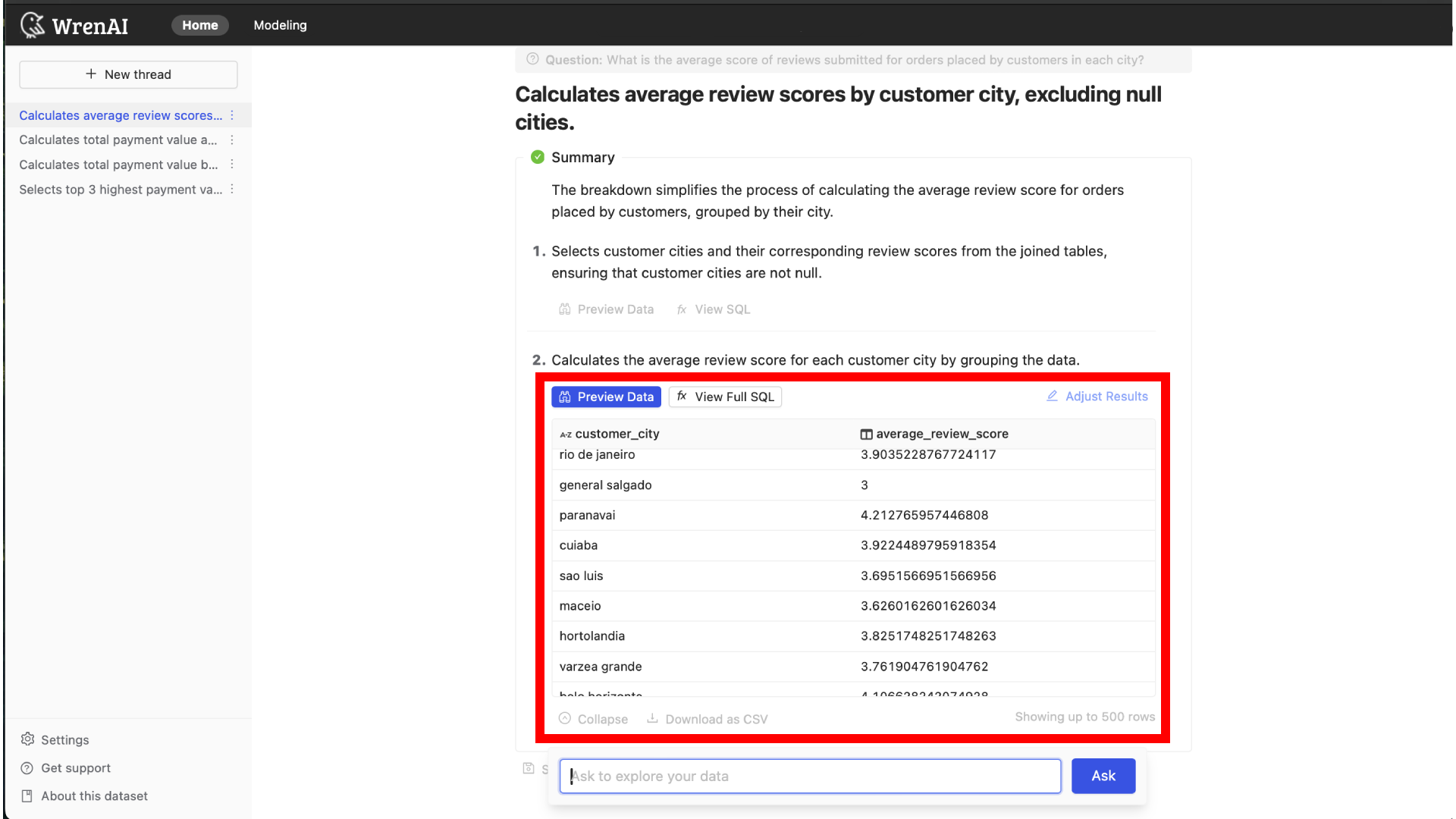
Once selected, the project will be ready to use, and you can start asking questions. After you ask a question, you can view each step's SQL plan description, data preview, and SQL statements.
Learn more about Adjusting Results and Wren SQL.
Explore the Data’s Entity Relationship Diagram
You can learn more about the tables that are available on the project modeling page. By clicking the tables, you can preview the data.
Learn more about Data Models.