Backup & Restore Metadata
Use this guide to export and restore Wren AI model and knowledge metadata through the API so you can keep those assets in local storage or version control.
This workflow is useful when you want safer iteration, Git-based change review, or a recovery path for model and knowledge changes.
What this workflow covers
Wren AI provides a set of CRUD APIs that allow you to programmatically export and import:
Using these APIs, you can:
- Export (backup) the current state of models and knowledge from Wren AI
- Store them as structured files on disk
- Version control them using Git
- Restore (sync) the files back to Wren AI when needed
Before you begin
Before using the backup & restore workflow, ensure you have:
- A valid Wren AI API Key
- The example backup and restore script from this page
- Python (or the required runtime specified by the script)
- Access to a local filesystem or Git repository
What gets backed up
The backup process exports the following resources:
| Resource | Description | Format |
|---|---|---|
| MDL | Model metadata and schema definitions | .mdl |
| Instructions | Knowledge instructions used by Wren AI | .json |
| SQL Pairs | Question–SQL example pairs | .json |
Backup file structure
All exported files are saved in a predefined directory structure to ensure consistency and easy restoration.
backup/
├── models.mdl
├── instructions.json
├── sql_pairs.json
This structure is designed to be:
- Human-readable
- Git-friendly
- Deterministic, so restores are predictable
Back up models and knowledge
Step 1: Configure API access
Set your API key as an environment variable or provide it directly to the script (recommended: environment variable).
export WREN_API_KEY=your_api_key_here
export WREN_PROJECT_ID=your_project_id
Step 2: Run the backup script
Run the backup script to export all current models and knowledge:
python wren_backup.py
script (wren_backup.py)
import os
import requests
import json
import sys

# 1. Configuration
# Retrieve secrets from environment variables
API_KEY = os.getenv("WREN_API_KEY")
PROJECT_ID = os.getenv("WREN_PROJECT_ID")

# Check if environment variables are set
if not API_KEY or not PROJECT_ID:
    print("❌ Error: Missing WREN_API_KEY or WREN_PROJECT_ID in environment variables.")
    sys.exit(1)

BASE_URL = f"https://cloud.getwren.ai/api/v1/projects/{PROJECT_ID}"

# Set up headers with Bearer Token
headers = {"Authorization": f"Bearer {API_KEY}", "Content-Type": "application/json"}

# 2. Define Endpoints and Target Filenames
# Key: Target filename (inside /backup folder)
# Value: API Endpoint URL
tasks = {
    "models.json": f"{BASE_URL}/models",
    "instructions.json": f"{BASE_URL}/knowledge/instructions",
    "sql_pairs.json": f"{BASE_URL}/knowledge/sql_pairs",
}

# 3. Prepare Backup Directory
# Define the fixed backup directory path
backup_dir = "backup"

# Create directory if it doesn't exist (exist_ok=True prevents error if it exists)
try:
    os.makedirs(backup_dir, exist_ok=True)
    print(f"📂 Directory '{backup_dir}' is ready.")
except OSError as e:
    print(f"❌ Error creating directory: {e}")
    sys.exit(1)

print(f"🚀 Fetching current state for Project: {PROJECT_ID}...")

# 4. Execute Fetch and Save
for filename, url in tasks.items():
    try:
        print(f"📥 Fetching data for {filename}...")
        response = requests.get(url, headers=headers)
        response.raise_for_status()  # Raises error for 401, 404, 500, etc.

        data = response.json()

        # Construct full file path
        file_path = os.path.join(backup_dir, filename)

        # Write to file (mode 'w' overwrites existing files automatically)
        with open(file_path, "w", encoding="utf-8") as f:
            # If data is a list (e.g., for sql_pairs or instructions), strip unwanted properties from each item
            if isinstance(data, list):
                filtered_data = []
                for item in data:
                    if isinstance(item, dict):
                        filtered_item = {
                            k: v
                            for k, v in item.items()
                            if k
                            not in (
                                "createdAt",
                                "updatedAt",
                                "createdBy",
                                "updatedBy",
                                "projectId",
                            )
                        }
                        filtered_data.append(filtered_item)
                    else:
                        filtered_data.append(item)
                json.dump(filtered_data, f, ensure_ascii=False, indent=2)
            else:
                json.dump(data, f, ensure_ascii=False, indent=2)

        print(f"✅ Saved to {file_path}")

    except requests.exceptions.RequestException as e:
        print(f"❌ Failed to fetch {filename}: {e}")
    except IOError as e:
        print(f"❌ Failed to write file {filename}: {e}")

print("✨ Snapshot completed.")
Result screenshots
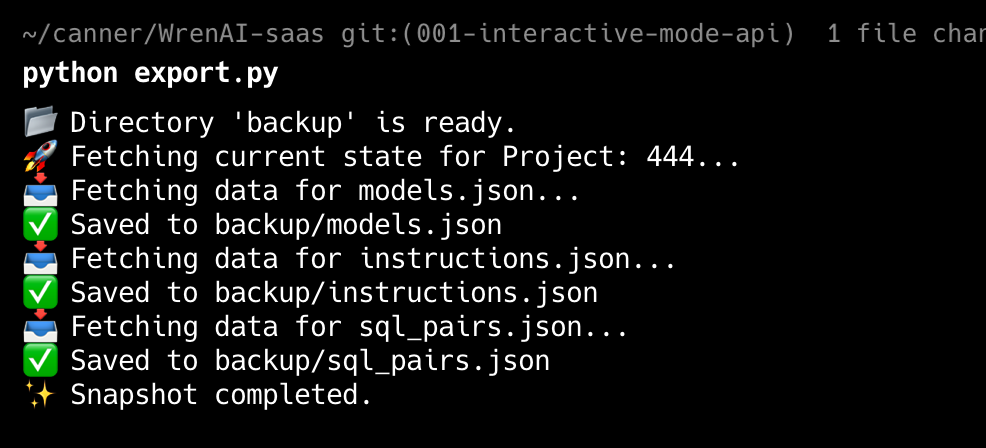
output of the script
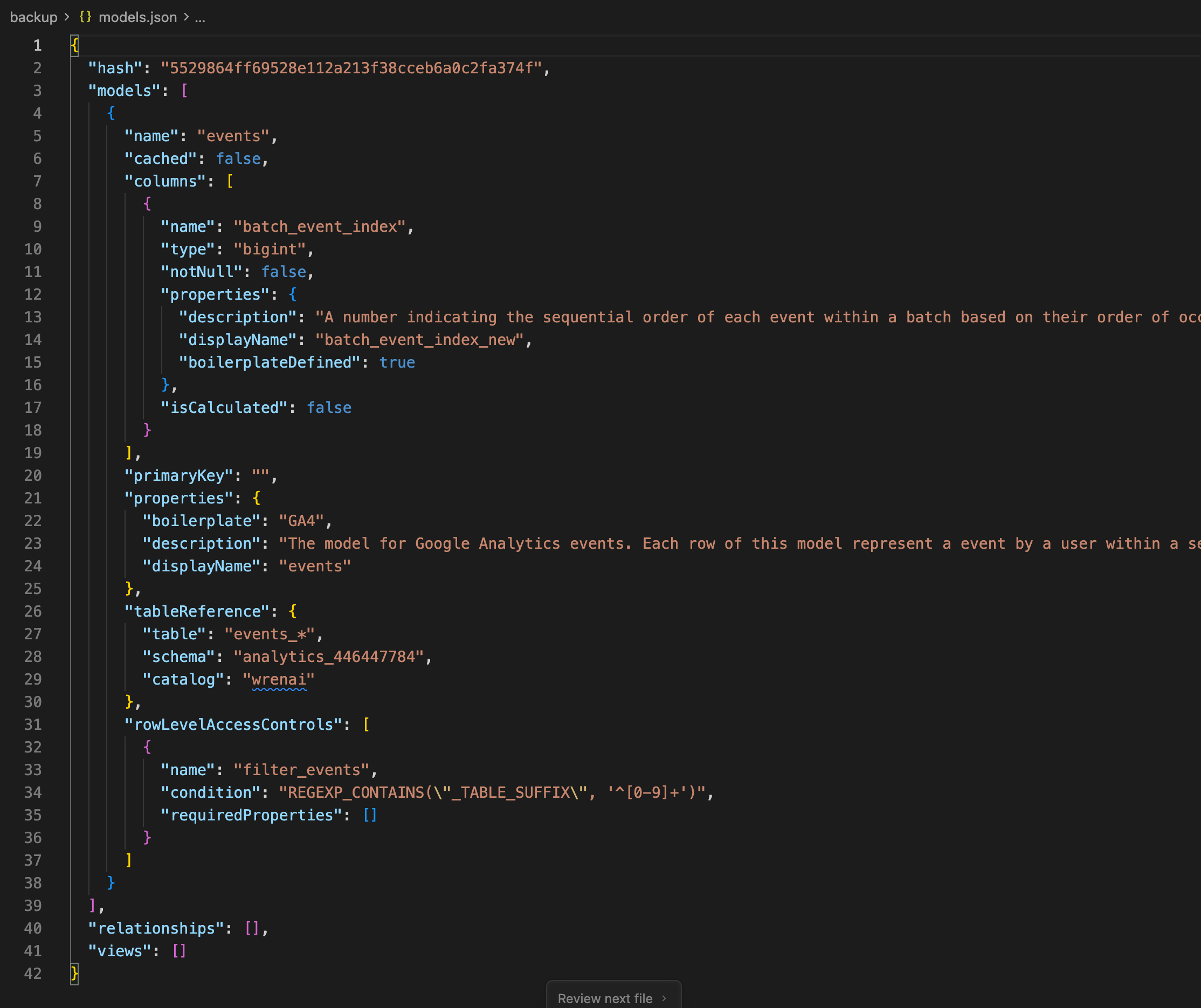
Exported models.json (MDL)
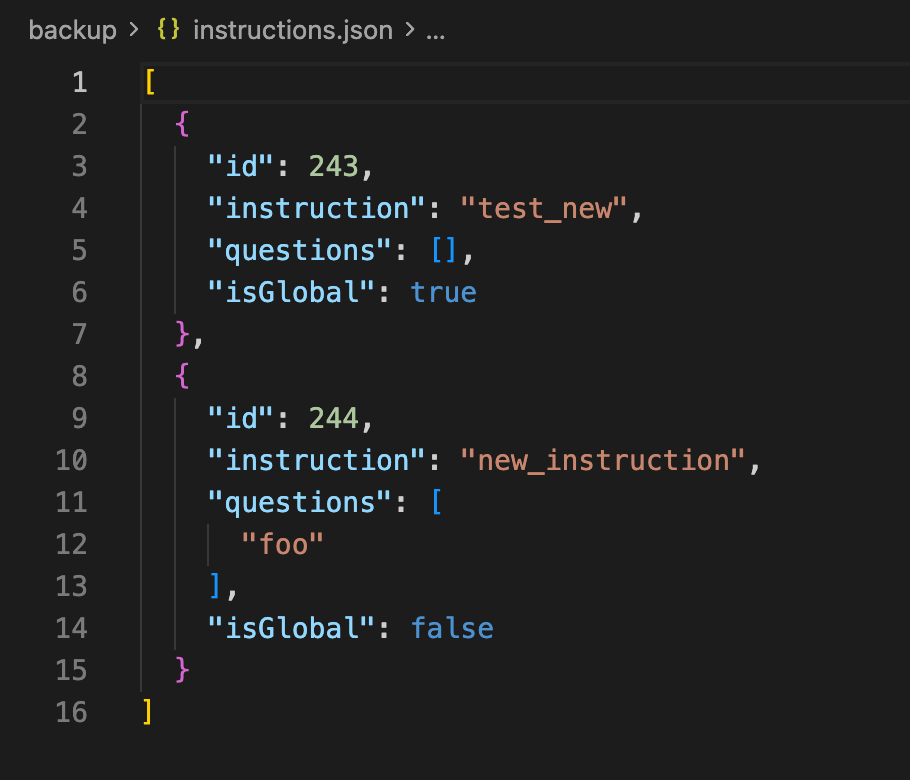
Exported instructions
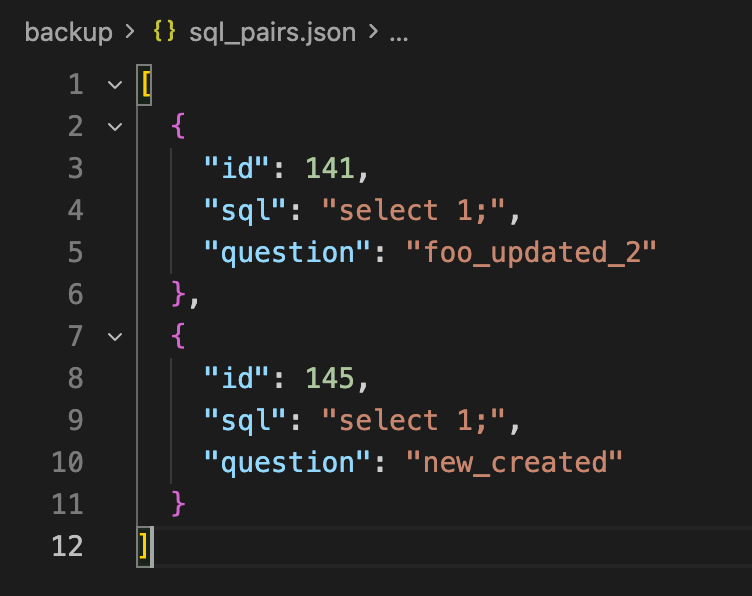
Exported sql_pairs
After execution, the script will:
- Fetch all models and knowledge via API
- Serialize them into MDL and JSON files
- Save them into the directory structure shown above
Step 3: Store the backup in Git (optional but recommended)
You can commit the backup directory to Git for version control:
git add backup/
git commit -m "Backup Wren AI models and knowledge"
This allows you to:
- Track changes over time
- Review modifications using Git diff
- Roll back to any previous version
Restore models and knowledge
You can restore models and knowledge from a previous backup at any time.
Before you restore
Please note:
- Restore operations may overwrite existing models or knowledge
- Ensure the backup directory structure has not been modified
- Make sure you are restoring to the correct Wren AI workspace
Step 1: Verify the backup structure
Ensure your input directory follows the expected structure:
backup/
├── models/
├── instructions/
├── sql_pairs
Step 2: Run the restore script
Run the restore script to sync local files back to Wren AI:
python wren_restore.py
script (wren_restore.py)
import os
import requests
import json
import sys

# 1. Configuration
# Retrieve secrets from environment variables
API_KEY = os.getenv("WREN_API_KEY")
PROJECT_ID = os.getenv("WREN_PROJECT_ID")

if not API_KEY or not PROJECT_ID:
    print("❌ Error: Missing WREN_API_KEY or WREN_PROJECT_ID in environment variables.")
    sys.exit(1)

BASE_URL = f"https://cloud.getwren.ai/api/v1/projects/{PROJECT_ID}"
BACKUP_DIR = "backup"

# Set up headers (Bearer Token)
headers = {"Authorization": f"Bearer {API_KEY}", "Content-Type": "application/json"}

# Fields to exclude from API payloads (metadata fields present in backup but invalid for POST/PUT)
EXCLUDED_FIELDS = {
    "id",
    "projectId",
    "createdAt",
    "updatedAt",
    "createdBy",
    "updatedBy",
}

def load_backup(filename):
    """Helper to read the backup JSON file."""
    filepath = os.path.join(BACKUP_DIR, filename)
    if not os.path.exists(filepath):
        print(f"⚠️ Backup file not found: {filepath}. Skipping.")
        return None
    try:
        with open(filepath, "r", encoding="utf-8") as f:
            return json.load(f)
    except Exception as e:
        print(f"❌ Error reading {filepath}: {e}")
        return None

def restore_mdl():
    """
    Restores the Model Definition (MDL).
    Target API: PUT /api/v1/projects/{projectId}
    """
    print("\n🔄 --- Restoring Models (MDL) ---")
    mdl_object = load_backup("models.json")
    if not mdl_object:
        return

    # Construct the payload required by the Update Project API
    # The backup is assumed to be the raw MDL object
    payload = {"mdl": mdl_object}

    try:
        url = BASE_URL
        response = requests.put(url, headers=headers, json=payload)
        response.raise_for_status()
        print("✅ Models (MDL) updated successfully.")
    except requests.exceptions.RequestException as e:
        print(f"❌ Failed to update Models: {e}")
        if e.response:
            print(f"   Response: {e.response.text}")

def sync_resource(name, backup_filename, api_path):
    """
    Syncs resources like Instructions or SQL Pairs.

    Logic:
    1. Load Backup & Server Data.
    2. Iterate Backup Items:
        - If Item has ID and ID exists on Server -> Update (PUT) & Mark as Kept.
        - If Item has no ID or ID not on Server -> Create (POST).
    3. Iterate Server Items:
        - If Server Item ID was not marked as Kept -> Delete (DELETE).
    """
    print(f"\n🔄 --- Restoring {name} ---")

    # 1. Load Backup Data
    backup_list = load_backup(backup_filename)
    if backup_list is None:
        return

    # 2. Fetch Current Server State
    list_url = f"{BASE_URL}/{api_path}"
    try:
        resp = requests.get(list_url, headers=headers)
        resp.raise_for_status()
        current_list = resp.json()
    except Exception as e:
        print(f"❌ Failed to fetch current {name}: {e}")
        return

    # Create a map for quick lookup: { "123": item_data }
    # Use string keys for reliable comparison
    current_map = {
        str(item.get("id")): item for item in current_list if item.get("id") is not None
    }

    # Track which server IDs have been matched/updated.
    # Any server ID not in this set after processing backup will be deleted.
    processed_server_ids = set()

    # 3. Process Backup Items (Update & Create)
    for item in backup_list:
        item_id = str(item.get("id")) if "id" in item else None

        # Prepare payload: Strip system fields like 'id', 'createdAt', 'projectId'
        # API expects clean payload (e.g., only 'sql' and 'question')
        payload = {k: v for k, v in item.items() if k not in EXCLUDED_FIELDS}

        if item_id and item_id in current_map:
            # Case: UPDATE
            # The item exists in both Backup and Server
            print(f"⚡ Updating {name} ID: {item_id}")
            try:
                requests.put(
                    f"{list_url}/{item_id}", headers=headers, json=payload
                ).raise_for_status()
                processed_server_ids.add(item_id)
            except Exception as e:
                print(f"   ❌ Update failed: {e}")
        else:
            # Case: CREATE
            # Either 'id' is missing (New Item) OR 'id' exists in backup but not on Server (Restore deleted item)
            # Note: Server will assign a new ID.
            if item_id:
                print(f"➕ Creating {name} (Restoring missing ID: {item_id})")
            else:
                print(f"➕ Creating {name} (New Item)")

            try:
                requests.post(
                    list_url, headers=headers, json=payload
                ).raise_for_status()
            except Exception as e:
                print(f"   ❌ Create failed: {e}")

    # 4. Process Deletions (Delete items on server not present in backup)
    for item_id in current_map:
        if item_id not in processed_server_ids:
            print(f"🗑️ Deleting {name} ID: {item_id} (Not in backup)")
            try:
                requests.delete(
                    f"{list_url}/{item_id}", headers=headers
                ).raise_for_status()
            except Exception as e:
                print(f"   ❌ Delete failed: {e}")

if __name__ == "__main__":
    print(f"🚀 Starting Restore Process for Project: {PROJECT_ID}")

    # 1. Restore Models
    restore_mdl()

    # 2. Restore Instructions
    sync_resource("Instructions", "instructions.json", "knowledge/instructions")

    # 3. Restore SQL Pairs
    sync_resource("SQL Pairs", "sql_pairs.json", "knowledge/sql_pairs")

    print("\n✨ Restore process completed.")
Result screenshots
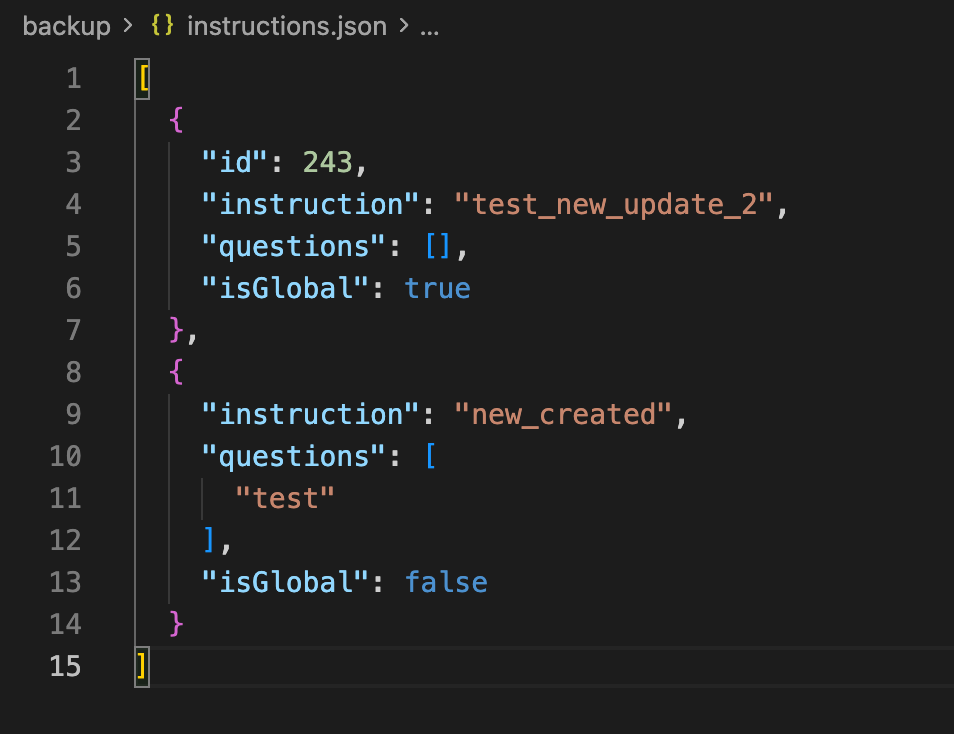
modified instructions
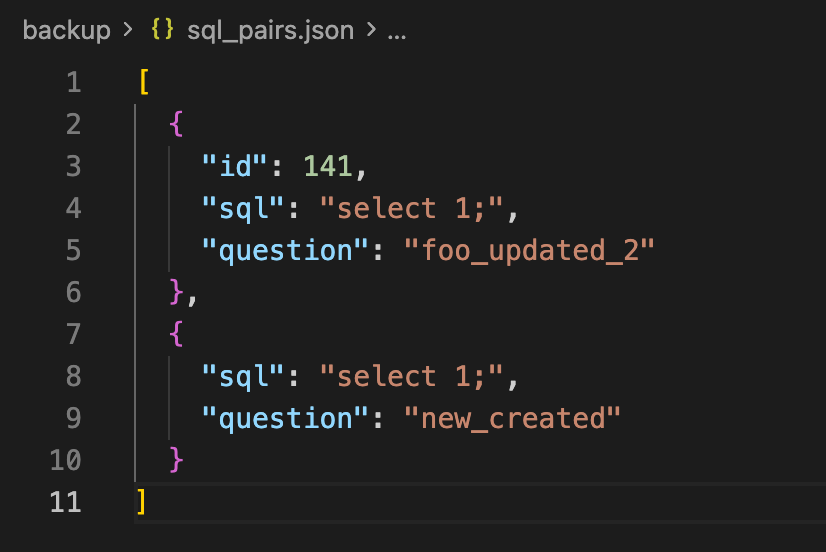
modified sql pairs
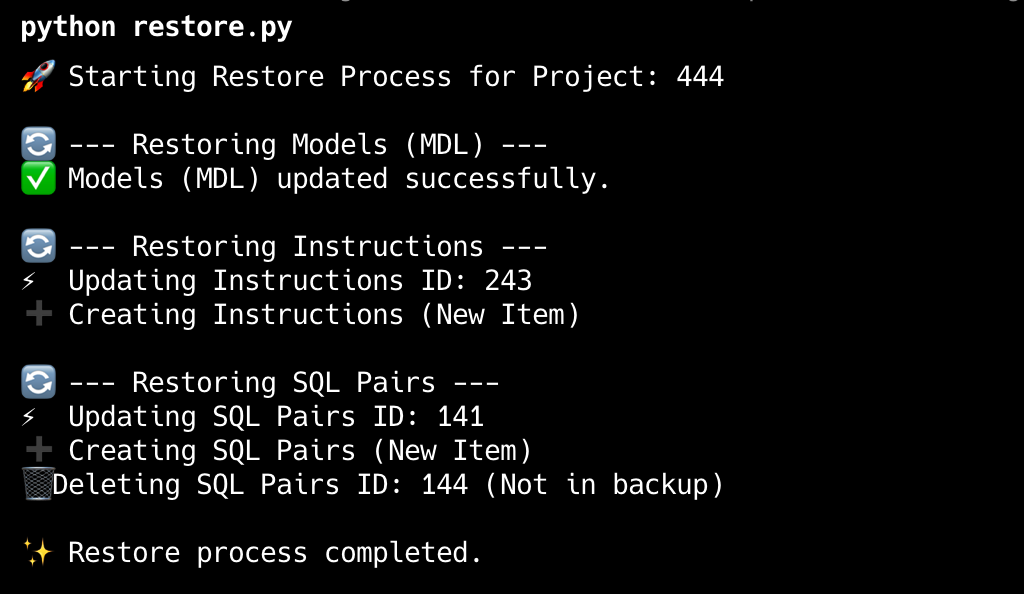
Output of the script
The script will:
- Read MDL, instructions, and SQL pairs from disk
- Call Wren AI APIs to create or update resources
- Restore the workspace state to match the backup