Wren AI
Open-source GenBI: your AI agents generate, deploy, and govern dashboards on the databases you already have, grounded in a context layer they can actually trust.
Wren AI is the open-source GenBI engine. It lets any AI agent turn a business question into governed BI, from a single SQL answer to a shareable, deployed dashboard, on top of the data sources you already have.
Generative BI is only as good as the context it stands on. So underneath GenBI, Wren AI is an open context layer: it sits between your data sources and any agent or application, and gives them the same machine-readable understanding of your business. That means what the data means, how it should be joined, which definitions are approved, and how queries should be planned against the underlying database.
The goal is simple: agents that produce trustworthy BI, not plausible guesses, on one governed context layer that every data consumer, human or agent, can share.
GenBI in three moves
| Move | What the agent does | Powered by |
|---|---|---|
| Generate | Turns a business question into governed SQL and charts | MDL planning, schema retrieval, dry-plan validation |
| Deploy | Ships the answer as a shareable, browser-side dashboard | wren-core-wasm → Vercel / Cloudflare Pages |
| Know | Captures the business meaning that keeps it all correct | MDL, knowledge/, memory (reviewable, Git-friendly) |
The rest of this page focuses on Know, because that is where correctness comes from: Generate and Deploy are only as trustworthy as the context underneath them.
Why Wren AI exists
Your agent reads schema, but schema does not tell it:
status = 4means refundedloyalty_v3is the table your team actually uses- "monthly active users" excludes service accounts
- "Project Lighthouse" maps to
campaign_id = 4172in a planning doc nobody linked to the warehouse
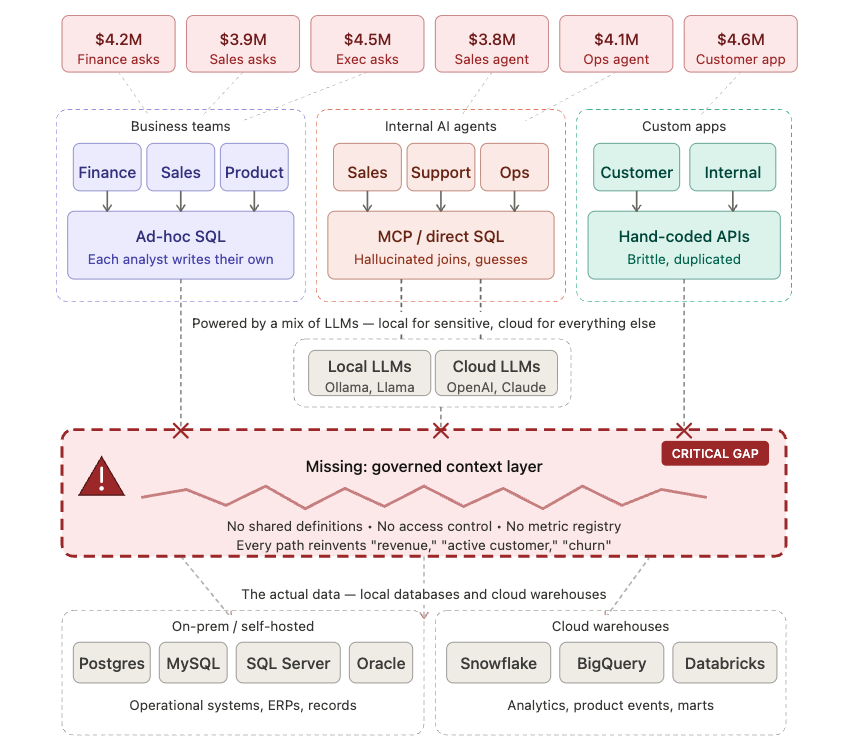
Without that meaning, the agent writes confident, plausible, wrong SQL, and a dashboard built on wrong SQL is worse than no dashboard, because it looks authoritative. The demo looks fine. The pilot looks fine. Production is where it breaks.
Business context cannot be locked inside someone else's product. Your business definitions outlive your tools, and they deserve a format your team can inspect, version, fork, and share.
What Wren AI provides
Wren AI turns raw database structure into a reusable context layer, then lets agents generate and deploy BI on top of it. It helps agents move from "I can see tables" to "I know what this business means by revenue, customer, refund, churn, and active account", and from "here is some SQL" to "here is a governed dashboard you can share."
For real business questions on real company data, an agent needs five layers of context (see What does Wren AI mean by context? for the full breakdown). These five layers are exactly what makes a generated answer, or a deployed dashboard, correct:
| Layer | What it gives the agent | Status |
|---|---|---|
| Structural | Tables, columns, types, keys, and relationships | Ships today |
| Semantic | Business-facing models, reusable calculations, canonical tables, enum meaning | Ships today |
| Business | Company definitions such as active customer, revenue, churn, and internal naming | Ships today |
| Operational | Approved join paths, sanctioned queries, governance rules, and things never to compute | In active development |
| Behavioral | Memory of past questions, successful SQL, user feedback, and examples | In active development |
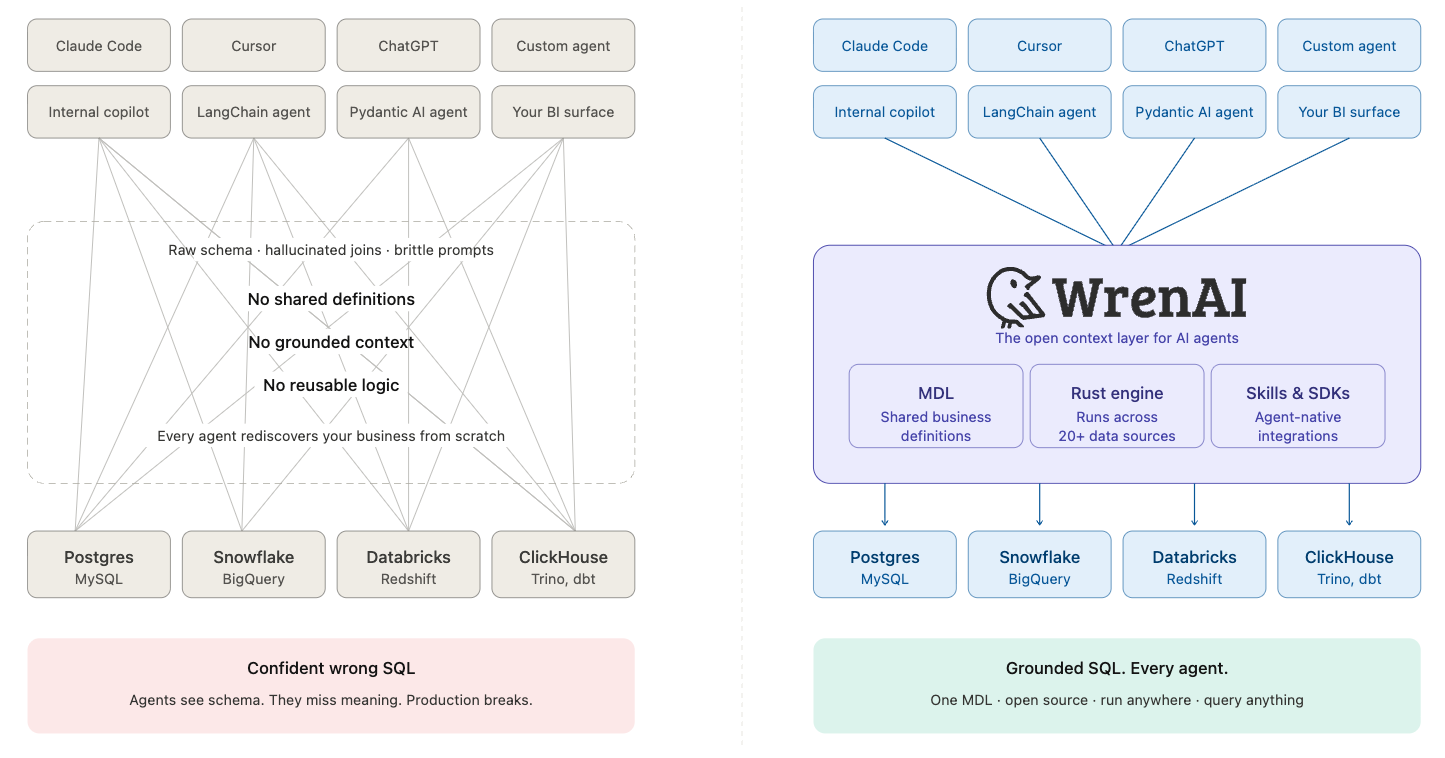
Here is what that looks like in practice. You write a small MDL file describing what your data means, and Wren AI plans every modeled query through it. See What does MDL do for the agent? for the deeper view.
# models/customers/metadata.yml
name: customers
table_reference:
  catalog: jaffle_shop
  schema: main
  table: customers
primary_key: customer_id
columns:
  - { name: customer_id, type: INTEGER, is_primary_key: true }
  - { name: first_name, type: VARCHAR }
  - { name: number_of_orders, type: BIGINT }
  - { name: customer_lifetime_value, type: DOUBLE }
The agent (or you, or any SDK) now queries customers as if it were a regular table:
$ wren --sql "SELECT first_name, customer_lifetime_value FROM customers ORDER BY 2 DESC LIMIT 3"
first_name   customer_lifetime_value
Tiffany      1245.67
Lukas        1102.30
Jennifer     1086.45
Behind the scenes, Wren AI:
- Looks up
customersin the MDL - Resolves it to the physical table declared in
table_reference - Drops columns not declared in the model (e.g.
email,phone), keeping them invisible to the agent - Applies your business rules from
knowledge/rules/(default filters, canonical tables, business definitions) - Returns rows
From there, the same context drives the Deploy move: ask your agent to turn an answer into a dashboard and it builds a browser-side GenBI app from the project and ships it to your own hosting. See Build & deploy a GenBI app.
What is in the open core
The open core includes:
- MDL (Modeling Definition Language): the semantic contract. MDL defines models, relationships, calculated fields, views, and agent-oriented metadata in files you can read, review, version, and fork.
- Rust semantic engine: powered by Apache DataFusion. It plans and executes modeled SQL across supported data sources such as PostgreSQL, MySQL, BigQuery, Snowflake, DuckDB, ClickHouse, Trino, SQL Server, Databricks, Redshift, Oracle, Athena, Apache Spark, and more.
wrenCLI: commands for querying, planning, validating, building context, profiling data, managing memory, and building & deploying GenBI apps.- GenBI apps: agent-built, browser-side dashboards powered by
wren-core-wasm, deployable to Vercel or Cloudflare Pages. - Skills: structured workflows such as
generate-mdl,onboarding,enrich-context, andgenbi, served on demand from thewrenCLI, that let AI coding agents operate Wren AI safely and reproducibly. - Framework SDKs: LangChain and Pydantic AI integrations for attaching a Wren project to agent frameworks.
- wren-core-wasm: the semantic engine compiled to WebAssembly, so MDL-aware SQL (and GenBI dashboards) can run in the browser.
Roadmap
The active arcs are end-to-end context enrichment, richer GenBI (more chart types, live-data dashboards), a correctness loop (including small golden evals agents can run), and tighter agent SDK coverage. See GitHub Discussions for live design threads and the prioritized roadmap.
Start here
- Install
- Quickstart with
jaffle_shopsample data - Connect your own database
- Build & deploy a GenBI app: the Generate + Deploy payoff
- Concepts: the design ideas behind the Know move
A note on the "GenBI" name
"GenBI" here means this open-source generative-BI capability: agents that generate governed answers and deploy dashboards on top of Wren's context layer.
The earlier Wren AI GenBI app, the Docker-based chat-first BI product, is
now Wren GenBI Classic and is sunset. Its code lives on the legacy/v1
branch and no security fixes will be issued. Existing deployments still work;
reference docs are kept under Wren GenBI Classic · Sunset
in the sidebar. For an actively maintained, hosted version of that classic
experience, see Wren AI Commercial.
Dig deeper
Each Concept page answers one design question: